



Producing video clips of appropriate length enhances communication over websites, presentations, advertising and social media. All these platforms reward content that resonates with their audiences’ viewing patterns and expectations. It takes production time to rebuild separate videos for each destination. Framia Pro makes this process simple because it can create professional videos from images, and the length of the video can be controlled. Additionally, users on platforms such as Framia Pro can enjoy its conversational workflow and compatibility with popular AI generation models.
- Why Video Duration Flexibility Matters in Modern Content Creation
- How AI Picture to Video Makes Duration Control Simple
- Benefits of Flexible Duration Settings for Different Projects
- Steps to Build AI Videos with Flexible Duration Settings Using AI Picture to Video
- Using AI Duration Settings Across Various Creative Industries
- Simplify End-to-End Creative Production with Framia Pro Canvas
- Framia Pro Features That Enhance Flexible AI Video Creation
- Best Practices for Creating AI Videos with Optimized Duration
- Conclusion
Why Video Duration Flexibility Matters in Modern Content Creation
Video length has a direct impact on engagement, clarity, and publishing success when it comes to digital content. Short ads work well to grab people’s attention, and educational information can be longer. In corporate presentations, timing is important, and the timing should adhere to what is set in the meeting. The flexibility of length also helps storytelling as scenes don’t feel rushed or dragged out. Multiple versions of the same video can be created from one source image without the need for re-creative efforts. This saves production effort and caters to the various audience expectations. Rather than rebuilding projects over and over again, creators choose the best duration for each publishing need.
How AI Picture to Video Makes Duration Control Simple
Duration management is made easy with modern generation tools even before the production process starts. AI picture to video lets creators set their desired video duration before generation, eliminating the need for post-editing. The chosen time ensures a seamless transition in all scenes. Longer outputs don’t repeat anything awkwardly and maintain a natural pacing, while shorter clips can keep the energy and focus. The uniformity of the images is also maintained since the direction of the animation is the same over any playback length. Several length options may come out of a single prompt, thus saving on repetition. Manual time changes are no longer required, and more time can be spent on creativity rather than technical editing.
Benefits of Flexible Duration Settings for Different Projects
Flexible duration times for a variety of creative objectives, without separate production workflows. They assist companies, teachers, advertising and marketing teams, and content creators in offering appropriate experiences on various platforms. A lyric video generator can also help in syncing a video’s pace with a song’s beat and maintaining creative uniformity.
Common applications include:
- Short promotional videos that provide a “short story” for ads and announcements.
- Explanations and elaborations for scenes to develop concept understanding.
- Corporate presentations that meet the schedule without the need for trimming over and over.
- Content created by one source and shortened to fit social media.
- Well-balanced pacing and expanded narrative motion, using creative storytelling.
- Important visuals with portfolio showcases, no rushed transitions.
Steps to Build AI Videos with Flexible Duration Settings Using AI Picture to Video
Step 1: Pick a video model before adjusting duration
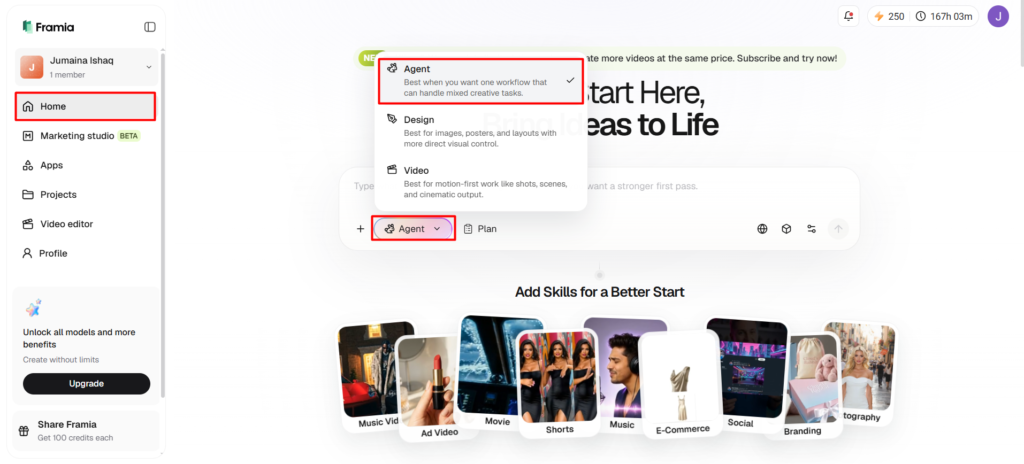
- Sign up for Framia Pro first. Next, open the “Home” tab from the left vertical menu and click “Agent” from the drop-down menu at the lower-left corner of the dialogue box.
- Choose the model that fits your video creation needs.
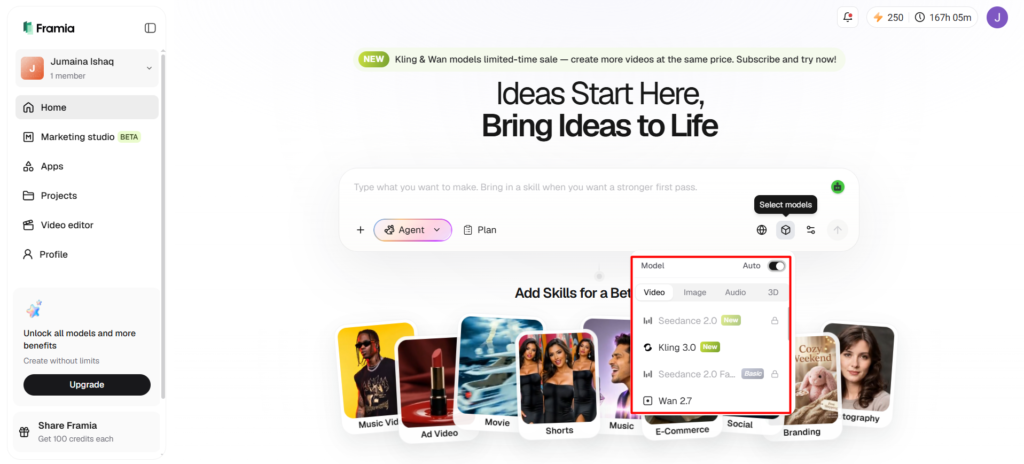
- Under the “Select models” menu, select the “Video” option.
- Continue by choosing “Seedance”, “Kling”, “Veo”, “Wan”, or “Gemini”.
Step 2: Upload your photo and customize video settings
- Click the “+” tab to upload one or several photos from your device for reference.
- Enter a prompt in the dialogue box describing how the uploaded image should become a video.
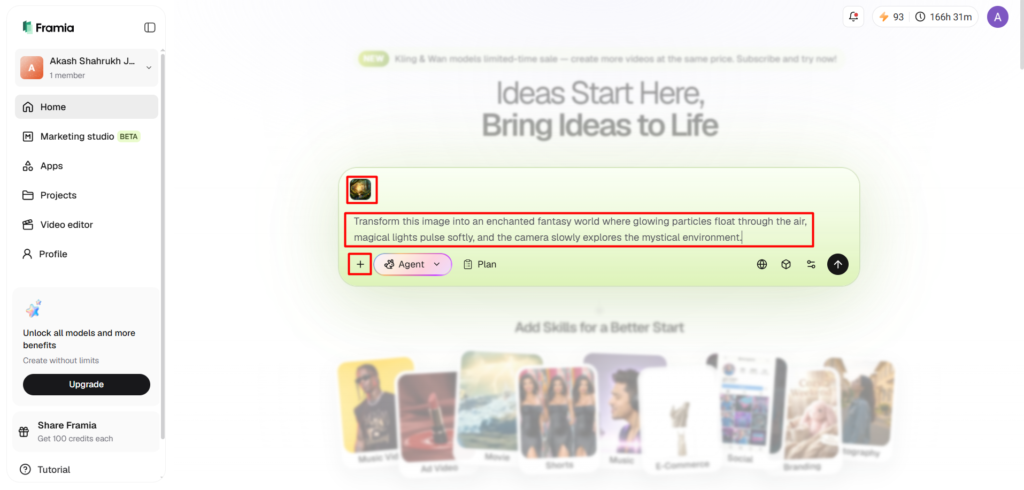
- Inside the “Settings” tab, select the aspect ratio, adjust the video duration, and choose the preferred video resolution.
- Click the “Generate” tab to start generating the video.
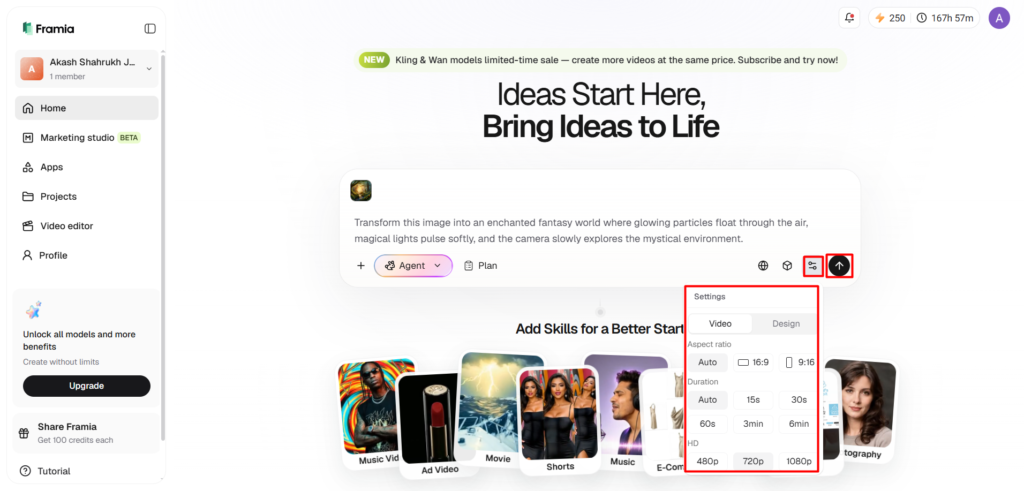
Step 3: Review the timing and download the result
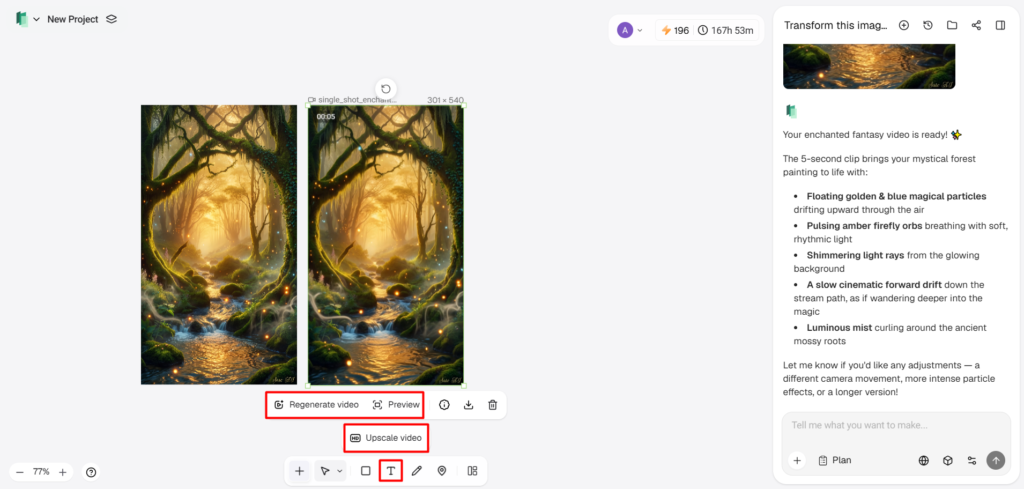
- Watch your project using “Preview”. If more improvements are needed, use the editing tools available in the bottom menu bar.
- You can “Upscale video”, “Regenerate video”, or edit your video with text to achieve the desired outcome.
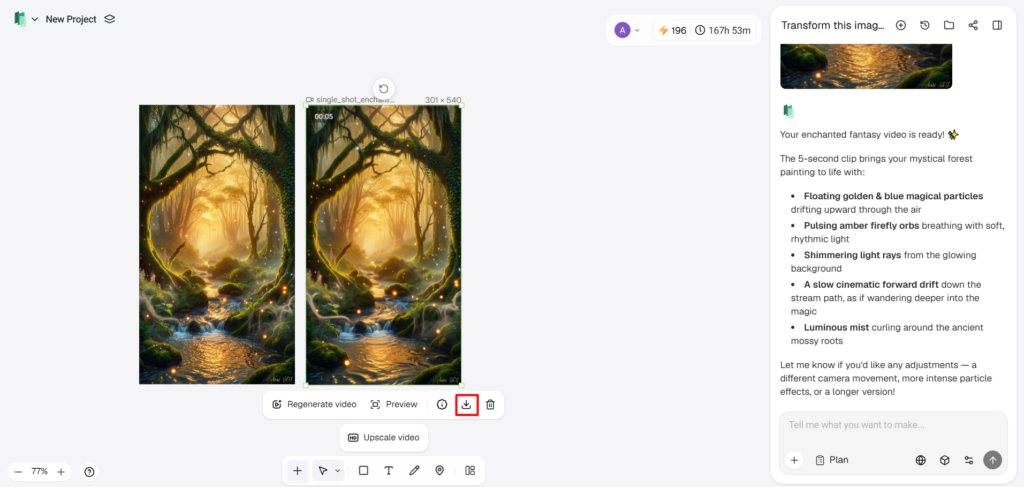
- After completing the edits, click the “Download” tab below the video to save it to your local device.
Using AI Duration Settings Across Various Creative Industries
The ability to set the length of the video is useful for many industries, as there are many different communication objectives. Ecommerce companies showcase products with short promotional clips that highlight critical features in an efficient manner. Real estate professionals develop property presentations that are comfortable to view, but not too much for the buyer. Slower pacing is often needed for training materials in order to retain the knowledge. Multiple versions for different advertising placements help to market campaigns. Social media reels and short-form content call for shorter storytelling, and longer explanations are often needed for internal communication within businesses. Adjustable duration allows for flexibility in publishing without compromising consistency or production quality.
Simplify End-to-End Creative Production with Framia Pro Canvas
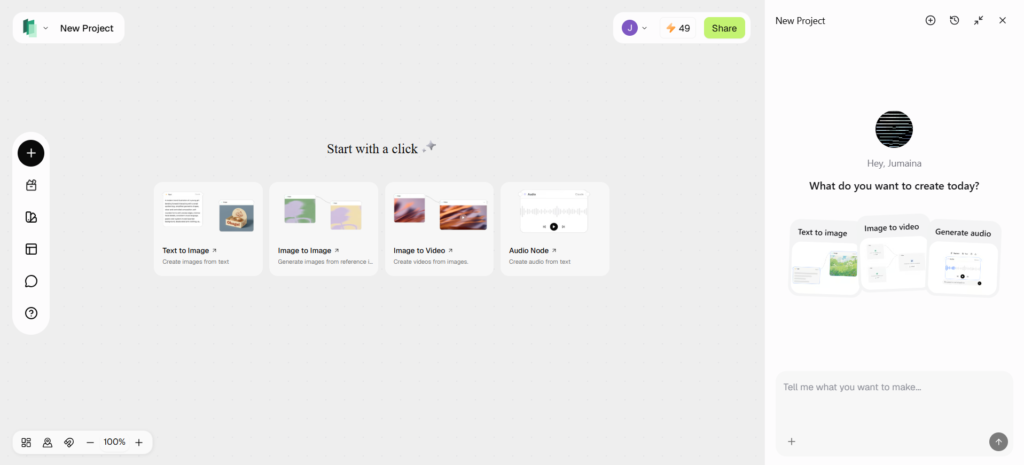
Framia Pro Canvas allows you to centralize marketing production in one workspace, rather than multiple apps. The users write the objective of the campaign in their natural language, and the platform creates an intelligent workflow automatically. Connected agents produce branded copy, graphics to promote, videos, add voice and music, and output in a polished format within an integrated editing environment. Several advanced generation models are available for visual production, and the integrated workflow eliminates the need for switching between different creative platforms. This structured process ensures consistency from conception to the final product, which can be downloaded.
Framia Pro Features That Enhance Flexible AI Video Creation
Framia Pro merges multiple functions that make the professional content creation easier while maintaining creative flexibility. Revisions are quicker and easier with conversational generation, which eliminates more complex interfaces and replaces them with natural instructions. Compatibility with various popular AI video models opens up more creative options to achieve different production objectives. Consistent character ensures that people and things are identifiable from one scene to another. Motion transfer technology produces realistic motion from still photos. Chat-based refinement allows you to make fast project improvements without having to build the project from scratch. The unified workspace integrates video, pictures, music and voiceovers. Framia Pro is designed to minimize workflow fragmentation. An anime generator can also be used to enhance specific creative endeavors that demand unique artistic expressions in a larger production process.
Best Practices for Creating AI Videos with Optimized Duration
Clear objectives are the first step to a successful project, before generation has even begun. Cater to the length of videos to fit audience expectations and platforms for better engagement. Description of movement in detail, because instructions are more accurate when describing the movement. Having a variety of durations will give you the flexibility to share content through different channels. Test all versions to ensure pacing, visuals and telling stories. Sometimes a few tweaks before exporting can enhance the viewing experience, while also minimizing needless revisions following publication.
Conclusion
AI video production becomes more feasible with flexible duration settings, meeting the demands of modern publishing. Each platform offers a unique viewing experience, and flexible timing eliminates any unnecessary production work. Framia Pro is software for creating professional videos from pictures with consistent video quality, a consistent pace and an efficient video creation process. Proper use of duration enhances storytelling, audience engagement, and polished outputs for presentations, marketing, education, business communication, and digital publishing to a variety of destinations.